
Instruction for Final Paper Submission
Accepted regular papers will be submitted to IEEE Xplore unless otherwise stated by the author. Authors are invited to submit their accepted papers in PDF format through EDAS by November 20, 2026
Step 1: Before Creating Your PDF File
Please read the reviews and follow the reviewers’ recommendations for revising your final paper. To guarantee good quality proceedings contents, your paper must comply with the ICA-SYMP 2027 paper specifications:
- Do not include IEEE copyright on the final paper. (EDAS system automatically includes it.)
- Proofread your source document thoroughly to confirm that it will require no revision.
- At least one of the authors listed on the accepted paper contribution MUST be registered for the conference when the final version is uploaded. Please make registration before the final paper submission.
- The conference maintains the right to refrain from reviewing papers that are significantly longer than four pages. For your submission, you can use the standard IEEE conference templates for Microsoft Word or LaTeX formats found in the IEEE template.
- If the IEEE template in MS Word is used, please check the page margin. (How to Embed Fonts in Microsoft Word)
- A maximum of two additional pages are permitted at an extra charge (THB 1,000 per page (~ USD 29)).
Step 2: Create Your PDF eXpress Account
It is highly recommended and mandatory if you choose to publish your paper in IEEE Xplore (This step is not necessary for position papers)
- Log in to the IEEE PDF eXpress site at https://ieee-pdf-express.org/ (available on Oct 19, 2026)
- Please use the Conference ID: #71694X for the IEEE PDF eXpress system.
- First-time users should do the following:
- Select the New Users – Click Here link.
- Enter the following:
- 71694X for the Conference ID
- your email address
- a password
- Continue to enter information as prompted.
- An Online confirmation will be displayed and an email confirmation will be sent verifying your account setup.
- Previous users of PDF eXpress need to follow the above steps but should enter the same password that was used for previous conferences. Verify that your contact information is valid.
- Upload your file, convert it, and check the status of the conversion. Once the conversion is complete, a report will be generated for the file conversion. Check whether the conversion was successful or whether some changes are needed.
- Access the Publications Support Center for IEEE PDF eXpress.
Step 3: Upload Your Paper to EDAS
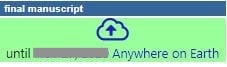
Log into the ICA-SYMP 2027 EDAS submission page. (The URL comes with your acceptance email.) and update the information and authors by following the link, as shown in the Figures below.
- My paper -> Click a cloud icon
- For regular paper, you will be asked to fill out the e-copyright form at this step.
- Please contact us: Napasool Wongvanich <napasool.wo(at)kmitl.ac.th> and Sudchai Boonto <sudchai.boo(at)kmutt.ac.th> questions.